Solving ASPE Loyalty Program AOs in CPA Canada PEP and CFE Cases

One of the key skills to assessing a financial reporting AO within a CPA Canada exam is understanding the differences between financial frameworks. We dove into depth of applying IFRS 15 to Loyalty Programs in a recent post. Where IFRS 15 provides specific guidance in the application of the standard, ASPE 3400 is judgement-based for recognizing and measuring revenue.

Example of ASPE 3400 Loyalty Program AO

Using the same example, consider the loyalty program of Entity A that sells shoes. For every $1 worth of shoe purchases, a customer receives 1 loyalty point. These points can be spent on purchases from Entity A and each point equals $0.10 worth of purchases. Based on historical trends, Entity A expects 5% of points to expire being unredeemed. That’s to say, it’s expected that 95% of loyalty points will be redeemed. So far, Entity A has sold $1,000 of shoes during the period. Assume no liability has been recorded in Entity A’s financial statements.

Analysis

The amount of revenue to be recorded needs to be assessed for Entity A. Under ASPE, this is based on a risks and rewards model, as opposed to IFRS 15 where control is the primary indicator. In this case, Entity A has an obligation to provide rewards to the customers that have earned them and collected loyalty points. This will trigger a need to assess whether a liability exists and should in fact be recorded.

To assess a liability under ASPE, the following factors should each be discussed using case facts:

  • Obligations arising from past transactions or events
  • Settlement may result in transfer or use of assets
  • Provision of services or other yielding of future economic benefits

Measurement

Since the customers earn 1 loyalty point for each dollar spent, you must estimate the amount of points that are outstanding at the end of the period. Given that $1,000 sales have occurred, approximately 1,000 points are outstanding. To determine the amount of liability that should be accrued, the points need to be valued. Since 1 loyalty point is redeemable for $0.10 worth of purchases, it could be estimated that $0.10 x 1,000 points = $100 as the cost to Entity A (or $0.10 value per point). Factoring in the likelihood of points to be redeemed, a more accurate estimate would be $100 x 95% = $95 for the liability.

Therefore, Entity A will need to accrue $95 liability at the end of the period. Entity A may be able to accrue a lesser amount if the percentage of points outstanding not redeemed changes.

Conclusion

As the points are redeemed, the liability will be reduced and revenue is generated. The liability will also be reduced when the option for these points expire.

The guidance for ASPE liabilities and revenue are presented in ASPE Sections 1000, 3290 and 3400.

Get effective CPA exam coaching

If you need helping passing your exams, check out CPA PEP and CPA CFE Review courses for a comprehensive prep package and coaching.

Solving IFRS 15 Loyalty Program AOs in CPA Canada PEP and CFE Cases

The core concept of IFRS 15 is the timing of revenue recognition, which is dependent on the timing of promises to be fulfilled by the entity. IFRS 15 provides significant guidance that can be applied to various situations retailers face, such as the treatment of customer loyalty points. Understanding loyalty programs is critical to foreseeing the liability a company owes and is a great topic for CPA Canada to test your IFRS 15 knowledge.

Example of IFRS 15 Loyalty Program AO

For example, consider the loyalty program of Entity A that sells shoes. For every $1 worth of shoe purchases, a customer receives 1 loyalty point. These points can be spent on purchases from Entity A and each point equals $0.10 worth of purchases. Based on historical trends, Entity A expects 5% of points to expire being unredeemed. That is to say, it is expected that 95% of loyalty points will be redeemed. So far, Entity A has sold $1,000 of shoes during the period.

Analysis

In this case, this option provides a material right to the customer that it would not receive without entering this contract (the purchase of shoes). It also gives the customer the option to acquire additional shoes at a price lower than the stand-alone selling price of the shoes in the future. This transaction involves committing to two performance obligations:

  • Goods purchased
  • Rights related to the loyalty points.

Because of this, it is necessary to estimate the stand-alone selling price of the option to allocate based on the separate performance obligations. For case writing, these criteria should be discussed with application to specific case facts. Write using the IFRS 15 5-step model and analyze the two performance obligations.

This estimate should account for the following factors:

  • Discount the option gives
  • Discount the customer could receive without the option
  • Likelihood the option will be exercised

Measurement

First, you must calculate the stand-alone price of the option. This is equal to the amount sold, factoring in the value of the points and point redemption rate ($1,000 x $0.10 x 95% = $95). The total transaction value is equal to the initial purchase value plus the value of the option ($1,000 + $95 = $1,095).

The amount sold ($1,000) should then be proportionally allocated to the loyalty program as a credit to accounts payable, and allocated to the product sales as a credit to revenue upon the initial sale of shoes:

  • Allocated to the loyalty program = $1,000 x ($95 / $1,095) = $87
  • Allocated to the sale of shoes = $1,000 x ($1,000 / $1,095) = $913
    (Note: As a check the total should equal the amount the customers have paid for (i.e. $1,000)).

Conclusion

If the likelihood of redemption cannot be determined, management may choose to assume 100% redemption or recognize revenue to the points on redemption. Revenue will also be recognized when the options for these points expire.

For some additional guidance on IFRS Loyalty Programs, check out paragraphs 26, B39-B43.

Get effective CPA exam coaching

If you need helping passing your exams, check out CPA PEP and CPA CFE Review courses for a comprehensive prep package and coaching.
Thank You


Thank you for subscribing! A receipt has been emailed to you.

If you’re a new member, you’ll receive an email to create your premium account. If you’re upgrading from free trial to premium subscription, please login to member’s area to start using your product.


CPA Speed-Type

Introducing SpeedType™ by Gevorg, CPA

GevorgCPA_Type_1

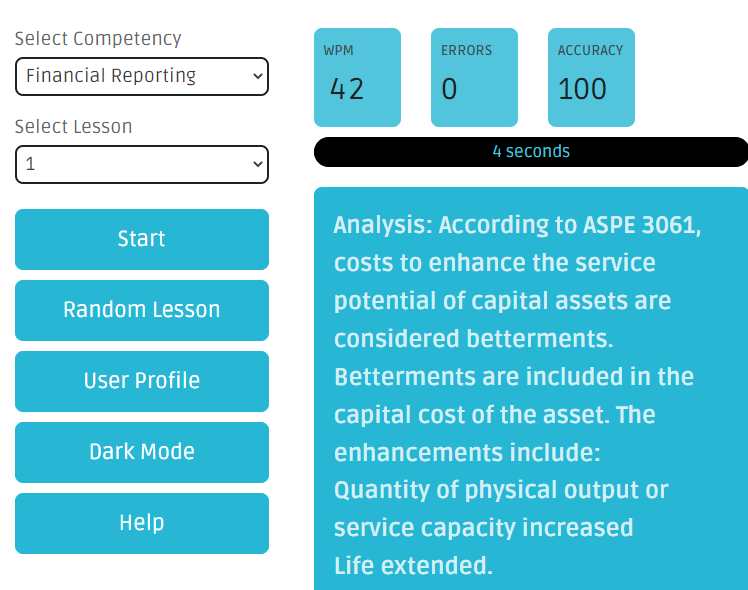
Finish CPA exam cases faster. SpeedType™ helps you improve your time management and typing speed. Using CPA Canada exam phrases and sentences, your fingers will learn to type fast where it matter the most. That’s not just from speed typing lessons, you’ll learn complex CPA technicals along the way.

 
Time management matters. Most CPA Canada candidates struggle with time management. Learn to type faster and unlock your full potential with over 90 typing lessons across all 6 technical competencies. Our specialized time management tool supports Core 1, Core 2, all electives and the CFE.
GevorgCPA_Type_2
GevorgCPA_Type_3
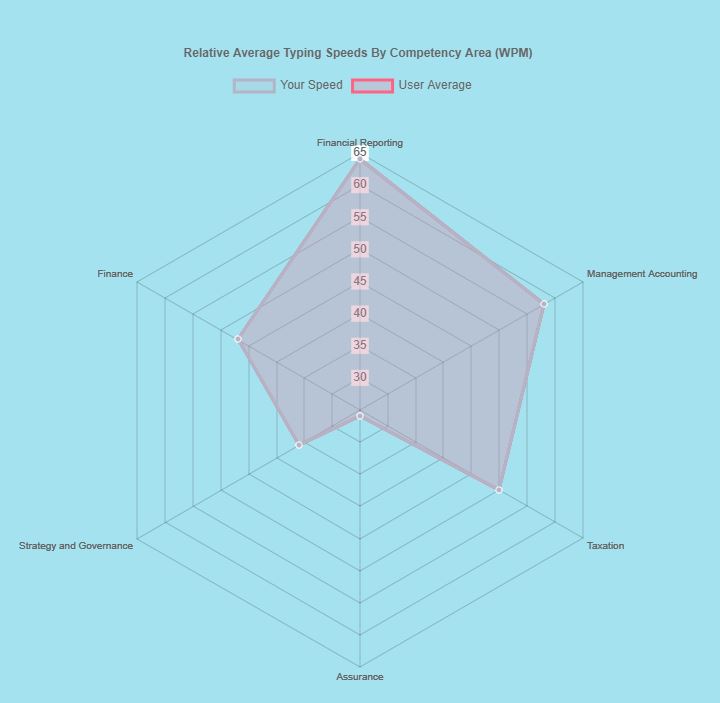
Simply smart. Get data and charts on your typing speed to stay on track and monitor your progress. Compare your WPM score with others to know where you stand.

How to Debrief a CPA Canada Case

As you continue on your journey towards your CPA designation, being able to debrief and achieve competency efficiency becomes increasingly important. In fact, debriefing will likely become your main study method.

1. Know when to debrief

The most effective way to debrief is not too long after writing the case. This way, the case facts are fresh in your mind and time can be saved from avoiding having to read the case again. Debriefing the case the following day will be more realistic and effective in managing a work-study balance.

2. Understand the marking competencies and how it relates to you

CD – Know what you completed very well, but not always the optimal rank.
C – Know what you you completed correctly
RC / NC – Know what you were on the right track on, but needed to include more
NA – Know what assessment opportunities you missed

The objective is to achieve a C, noting that achieving a CD might mean you spent too much time on one assessment and could have used that time elsewhere. The goal is to do enough required for each assessment. Focus your attention on the assessments that are not at a level C.

3. Review the sample responses

A sample response will show the level of depth/breadth expected of a candidate writing under the time constraints. Review how you could have approached a quantitative and qualitative analysis more efficiently, what case facts might have been missed, etc. Think “What more did I need to include in my response?”.

4. Review the solution

The solution demonstrates a “best” response, meaning, under no time constraints. It should be noted that candidates are not expected to strive for perfection. However, the solution provides a resource to ensure that your notes are complete.

5. Create and organize your notes

Organize your notes by topic (i.e. Financial Reporting, Tax, etc.) and continue to add to them each debriefing session. Watch as your knowledge on the topics expand over time.

6. Give enough time to the debrief process

Do not rush the process of debriefing and making notes. Typically debriefing a case should take as long as it took you to write the case (i.e. debrief 2 hours for a 2 hour case).

While debriefing can be an intimidating process, it is a necessary process to ensure you are making the steps to improving with each and every case. Building this habit will make the CPA journey much more manageable.

Get effective CPA exam coaching

I’m Gevorg, I’m an instructor and a CPA exam coach. If you need helping passing your exams, sign up for my CPA PEP and CPA CFE Review Course for a comprehensive prep package.

FolioViews on CFE – Tips and Tricks for CPA Canada Candidates

With the transition to writing the CPA Canada Common Final Exam (CFE) in hotel rooms, a software called FolioViews has been implemented by CPA Canada to replace Knotia as reference during the exam. You’ll get access and download FolioViews in Capstone 2. I’ll share tips and tricks in this post.

Tip #1: Narrow the search

When searching in FolioViews, you search through the entire database. This means your results will be all over the place. To be efficient, checkmark the standard you would like to search and it will narrow down the search. For example, if your CFE case is IFRS, checkmark IFRS so that FolioViews searches only there:

Tip #2: Use advanced search

There are two ways to search in FolioViews: [Basic] Query and Advanced Query. Both are accessible through Search drop down on the top toolbar:


The basic Query will search in the database and show you the results on the bottom of the screen. For example, I searched the term “biological” and FolioViews found several results:


The Advanced Query is better in the sense that it lets you see the number of results before you perform the search. It also shows you the results when you use phrases. For example, when I search “biological asset” using Advanced Query, it shows me that there are 48 matches. This is useful in determining if my multi-word query will lead to results (or no results) before I execute the search.

Tip #3: Assign a hotkey to Query

The first instinct when making a search is to press CTRL + F (like you do in other programs). In FolioViews, this brings up “Find Infobase”, which is not that useful. Let’s re-map this hotkey so that CTRL + F performs a basic Query:

  • Click on Tools > Customize
  • Choose Keyboard
  • In Command Category, pick Search
  • Click on Query
  • Click on the box “Press new shortcut key” and press CTRL and F on keyboard. It will say that this hotkey is assigned to another command. Ignore it, click Assign on the top.
  • Press OK to accept the changes.

Now you can perform a basic Query with CTRL +F and Advanced Query with the default hotkey F2.

Tip #4: Use HitList tab

In both basic Query and Advanced Query, the results are shown in All tab, on the bottom:


This is hard to work with, so I suggest clicking on HitList tab and scrolling through results there. This is much faster than clicking on next/previous hit buttons. Once you found your desired result, double click and it will open that record. Note that it will then take you to Document tab; click on All tab to return to the original view.

FolioViews Installation Guide

As candidates will be required to access their reference material through FolioViews, below is a short guide on how to install FolioViews as well as NFO files.

  1. Installation files are in D2L “Introduction to Capstone 2” and the CFE.
  2. Right click on the zip file and select open.
  3. To start installing, double click on the file “VPL_FOLIO_VIEWS_471.exe”.
  4. Follow the steps that appear on your screen, such as “ accept the terms of the licence agreement.” and selecting “Typical (Local) Installation”.
  5. Download CPA Handbook Folio and Income Tax Collection Folio (shown above) by right clicking on the files and selecting “Extract All”
  6. Select “Browse” and find destination “C:VPL\NFO”. Then click “Select Folder” and “Extract”
  7. Click on the “Start” button in Windows and find the folder “Virtual Professional Library”. Click on the “Folio Views 4.7.1” link.
  8. Upon start up, the page “Folio Views Getting Started” will appear.
  9. Open the files you downloaded within the NFO folder by clicking “File” and “Open”.


Other notes:

  • FolioViews is not compatible on Macs.
  • If you’re using an employee-issued laptop, ensure no conflicts with any existing software with your IT department.
  • FolioViews files can be downloaded an unlimited amount of times.

Get effective CFE coaching

I’m Gevorg, I’m an instructor and a CPA exam coach. If you want coaching with me, sign up for my CPA CFE Review Course for a comprehensive prep package.

CFE Review by Gevorg CPA


How to Account for Future Income Tax (DTA/DTL) IAS 12 in CPA Canada PEP and CFE

CPA Canada Knotia eBook explains income tax accounting in Chapter 23. However, student struggle understanding the steps in calculating and journalizing the deferred tax asset (DTA) and deferred tax liability (DTL) in cases. Here is a quick summary.

Explanation of future income taxes (FIT)

The idea behind future income taxes (FIT) is to book a liability for future payment of taxes (due to differences in accounting vs tax income). We have to do this because this is money we owe in the future to CRA, like accounts payable we owe to vendors, and GAAP says all obligations must be shown on F/S.

We have these differences for many reasons. A common one is the depreciation rate. We record depreciation at one rate while CCA is at another rate. There is a difference that is owed and we record this difference to FIT liab and FIT expenses.

Part A: Example

Step 1a: Calculate temporary differences 

To determine the temporary differences, deduct tax base from accounting base.

[Temporary difference = Accounting base – tax base]

Note: Both the Accounting base and Tax base are usually given in the case.

Step 1b: Determine if taxable or recoverable temp difference

Using the results from Step 1a:

  • If the total temp diff is negative => Deductible => DTA
  • If the total temp diff is positive => Taxable => DTL

Step 2: Calculate DTA/DTL

To calculate DTA/DTL, multiply the tax rate by the total temp differences from Step 1a.

[DTA/DTL = Tax rate % x total temp diff (from Step 1a)]

Step 3: Adjust DTA/DTL to actual

  • step i) Look at the balance of DTL/DTA from prior year in B/S (this should be given in the case)
  • step ii) Look at the balance for current year (calculated in Step 2)
  • step iii) post an AJE to adjust the balance from prior to current.

Example from the eBook

The following is the breakdown of the example seen in the CPA Canada eBook Chapter 23:

  • Step 1a: We found it’s -$10,000 (the eBook doesn’t show negative, but it is negative since accounting base is smaller than tax base)
  • Step 1b: It’s negative, so DTA.
  • Step 2: DTA: $10,000 × 45% = $4,500
  • Step 3: AJE
    Prior = $10,400 DTL
    Current = $4,500 DTA
    AJE:
    Dr DTL $10,400 (to remove prior from B/S)
    Dr DRA $4,500 (to add current to B/S)
    Cr Deferred tax recover $14,900 (plug to balance the entry)

Part B: Memo

IAS 12 Income Taxes

Calculations/quants are half of the marks. You won’t get C by simply following the above steps. It’s important to quote the technical from CPA Canada Handbook correctly. This is illustrated below.

Issue:

ZZZ Co. has provided information regarding the income taxes. The issue is what the deferred tax provision calculation for 20XX should be.

Analysis:

  • According to IAS 12, para 5, temporary differences are differences between the carrying amount of an asset/liability in the statement of financial position and its tax base.
    • As seen in App X, there is a total deductible temporary difference of $XXK (NOTE: calculate per above steps 1a, 1b, and 2)
  • Furthermore, according to IAS 12, para 5:
    • DTA are the amounts of income taxes recoverable in future periods in respect of deductible temporary differences, the carryforward of unused tax losses, and the carryforward of unused tax credits.
    • DTL are the amounts of income taxes payable in future periods in respect of taxable temporary differences
      • This means DTL rise from taxable temporary differences, while deferred tax assets (DTA) rise from deductible temporary differences. Given that the total $XXK is a deductible temporary difference, this amount is a DTA.
  • Furthermore, according to IAS 12, para 24, DTA shall be recognized for all deductible temporary differences to the extent that it is probable that taxable profit will be available against which the deductible temporary difference can be utilized
    • MET: ZZZ Co. is growing rapidly with positive financial results. There are no indications that a taxable profit is not probable in the near future.

Recommendation:

Based on the above analysis, I recommend recognizing DTA of $XXK and Deferred tax recovery of $XX, per AJEs in App X. (NOTE: calculate per above Step 3 )

Got questions about the CPA program? Contact me for advice: http://gevorgcpa.com/contact

Your Support Options with CPA Canada PEP and CFE

CPA Canada exams are grueling and require hours of dedicated study and practice. At some point, you may feel that you need supplemental support. Here are your options.

Option #1: One-on-one CPA tutor

You can hire a CPA tutor to sit down with you, act as your coach and provide one-on-one help. Tutors usually don’t have supplemental cases, they use CPA Canada’s cases and answer your questions. You pay per hour and the usual fees are $60-$100/hr (depending on experience).

Option #2: Case marking

You can hire someone mark your cases and pinpoint the areas to work on. The difference with this option is that you don’t have live sessions with someone, the feedback is done on paper, similar to CPA facilitators. You pay per marked case and the fee is usually $40-$100 (depending on case length).

Option #3: Supplemental cases, practice drills

You can get supplementary materials such as extra cases, drills, study notes. With this option, you would study independently using the materials. The prices vary greatly depending on the type of material you purchase.

Option #4: Coaching program

You can sign up for a coaching program. The great thing about a CPA coaching program is that it’s an amalgamation of above support sources: You receive the live coaching, supplementary materials, and case marking.

Which one is best for you? It depends on your circumstances and your budget. If you failed your exam twice, I highly recommend hiring a one-on-one tutor or signing up for a coaching program. These resources will help you find where you’re going wrong and help you correct and improve it.  If you are taking your module for the first time, you may want to purchase supplemental materials and study independently. After a few weeks, if you feel that you’re struggling, consider upgrading to the other options.

Got questions about the CPA program? Contact me for advice: http://gevorgcpa.com/contact

How to Download Survival Guides for CPA Canada PEP Modules

  • Update: The Survival Guides have been replaced by PEP Syllabus. Please see this updated post.

The CPA Canada Survival Guides are an excellent resource to keep track of eBook readings, assignments, deadlines and deliverables. It’s a good idea to download and print them before your module starts, so that you complete your readings in advance.

Here are the steps to download the survival guide for any module:

Step 1: Access D2L

Go to CPA Canada’s learning D2L platform: https://education.cpacanada.ca/d2l/loginh/

Step 2: Click on Introduction to PEP course

You’ll see the courses you’re registered in the home page. Click on “Introduction to PEP”

Step 3: Scroll to the bottom until you see Survival Guides

Go to the bottom of the page until you see Survival Guides:


Now you can download and save the latest survival guides!

Questions or concerns? Contact me for help: http://gevorgcpa.com/contact